
Calling the show
The calling script converts every cue in the plot into a complete spoken line. The script is generated from the plot itself: when a cue changes, the corresponding line changes with it. No separate document is maintained.
The calling view
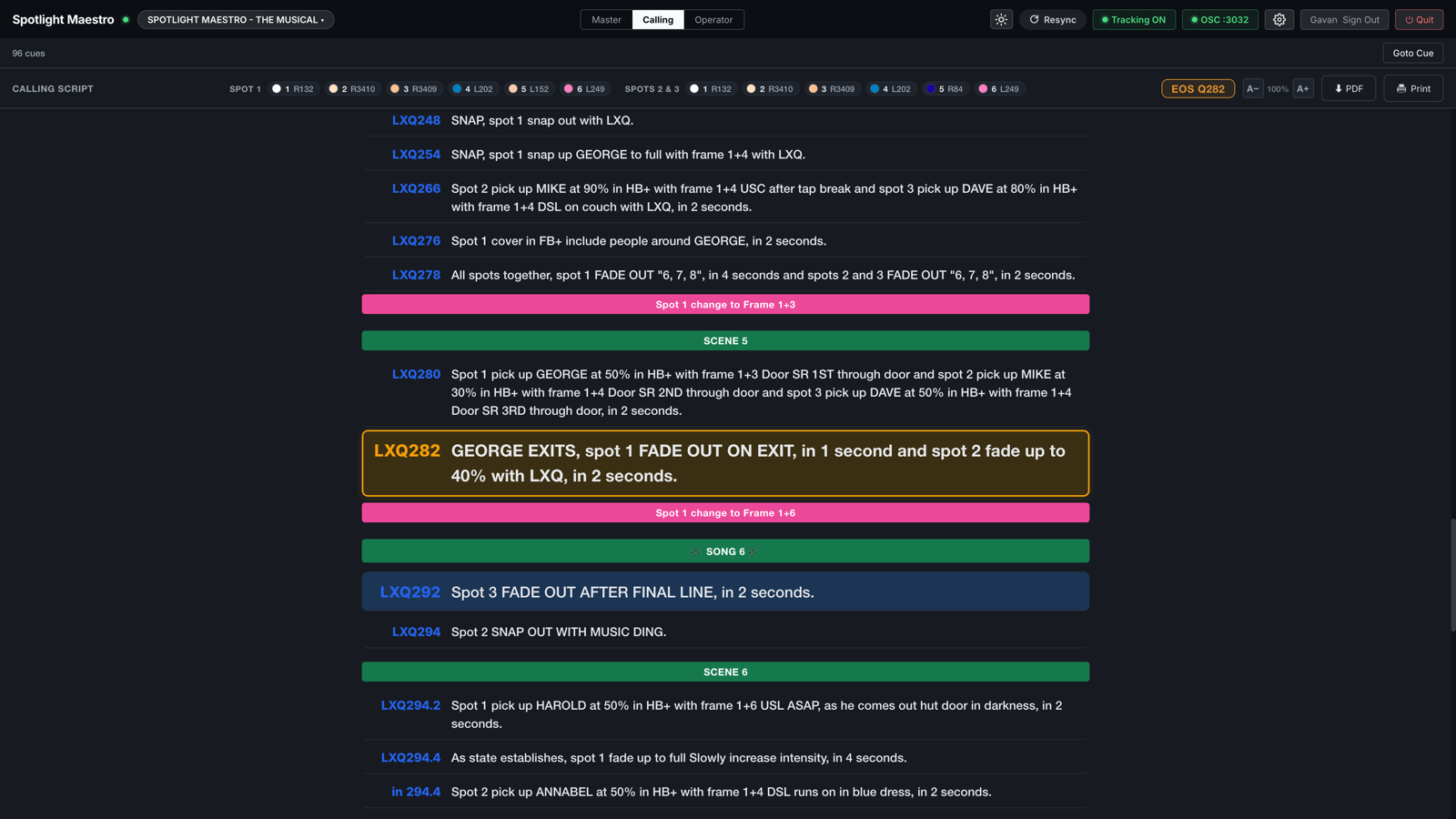
The Calling layout presents the whole show as one line per cue, with scene and song banners between lines. It tracks the console in the same way as every other layout: the live line is held high on the screen and the next line is highlighted.
- Select a line, or use the arrow keys, to take manual control on this device. The next console cue restores automatic tracking.
- The toolbar carries the show title, the colour frame legend, the live console cue, a text size control, and PDF and Print buttons.
- Frame changes made while a spot is dark appear as separate prompt lines. Preset lines above the first cue state the frame each spot loads before the performance.
- Scene break banners carry their colour, and their type (Song, Dance) at the right end once the production names more than one type in Settings, Options, Scene break types.
- On a remote control rig, a CONSOLE cue that takes a spot to zero adds "intensity fader down" to the line, after "desk takes the level".
How a line is constructed
Each line is generated from the cue's own fields: trigger, action, character, intensity, frame, size, note and time. For example:
On the Stage Manager's call, Spot 1 pick up VIVIAN at 100% in half body with frame 1 and 2, and Spot 2 slide to EDWARD, in 3 seconds.
The generation rules:
- Spots with identical instructions are merged into one phrase, and a time shared by every group in the line is stated once, at the end.
- The When text opens the line. It is the trigger the caller acts on. Page numbers are never spoken.
- Plain numeric console cue references are spoken with the cue prefix, for example LXQ287. Any other text in that column, such as "in 298", is read exactly as written.
- Zero-count cues are called as snaps: snap up, snap down or snap out, selected by the level the cue ends on. A two-movement value such as 0/90 is read as "out then up to 90".
- Live colour changes are flagged within the line when a frame changes while the spot is lit. Changes during a dark period become their own prompt line.
- Hard edge is called on the way in, on pickups and colour changes, and is not repeated on every subsequent line.
- Times are spoken naturally. A half is worded, not read as a decimal: "in half a second", "in 2 and a half seconds".
- Notes are incorporated intelligently, and nothing is said twice. Notes commonly restate the cue's fields in the caller's own shorthand: "Restore to 70%" written beside a Fade Up 70. The script recognises when the note already states the action, the level or the character, and drops the duplicated part from the structured phrase, keeping the note's own wording. Where the note states the action but omits the character, the name is slotted in after the note's opening word. A compound action such as "fade up and iris in" is never dropped, because a note covering only half of it would silently lose the rest.
Wording configuration
Settings, Calling Script controls how lines are written.
- Spots in the calling script. Selects which spots the script includes, for productions where a spot is called from elsewhere or not called at all.
- How lines are built. Structured builds each line from the cue fields and appends the note. Notes led speaks the Location/Note text as the line where one exists, reverting to structured wording on cues without a note.
- Name the carried character on continuation cues. Off by default. A spot commonly stays on one character across several cues; enabling this repeats the name in every line.
- Don't call the preset frame. Off by default. On a show that lives in one frame combination, "with frame 1 and 5" on every pickup says nothing. Enabled, the script names a frame only where it differs from the spot's preset. Live colour changes are always called.
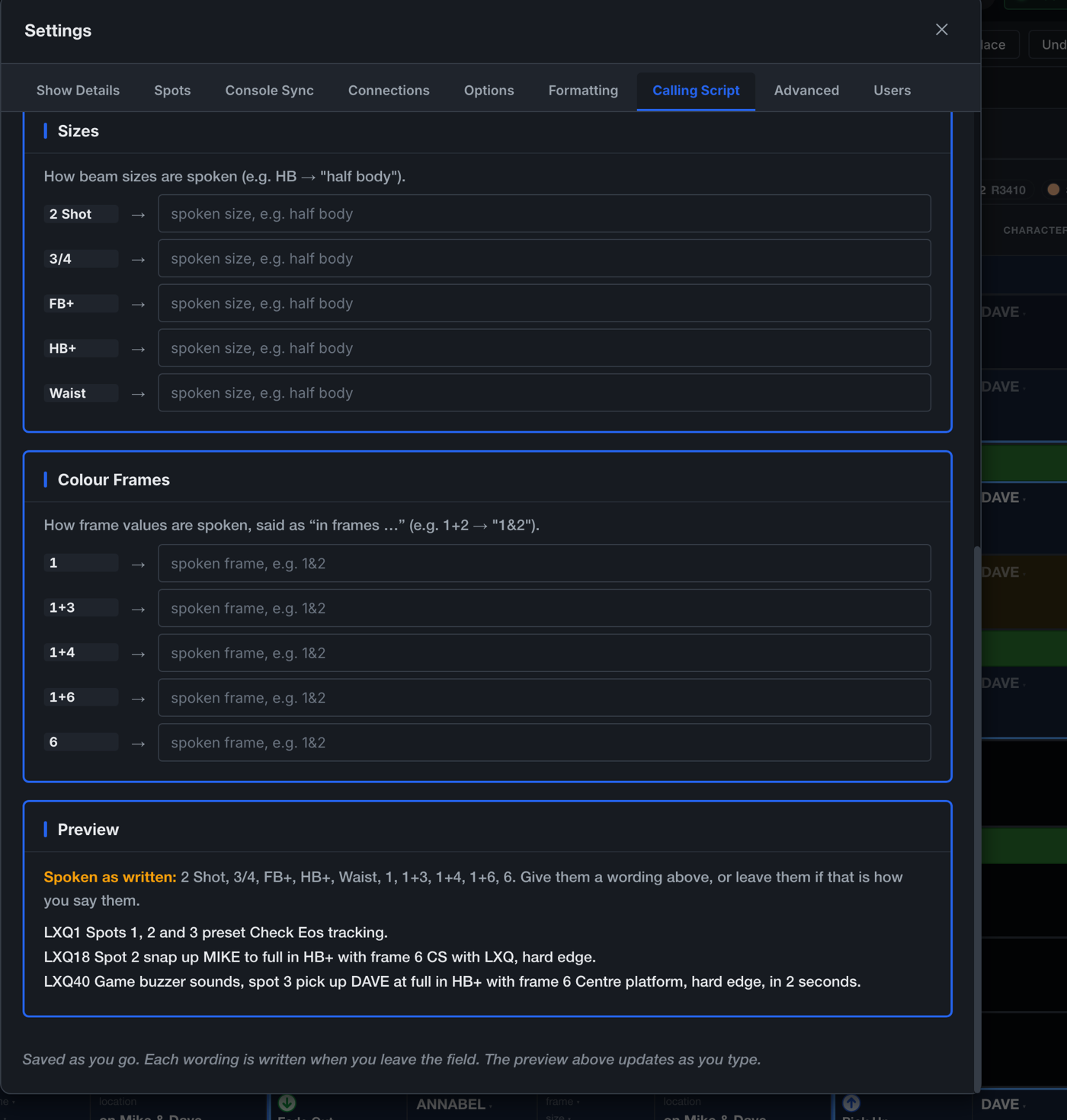
- The lexicon. A per-production mapping from written values to spoken words: for example, H&S to "head and shoulders", or frame 1+4 to "one and four". The editor lists only the values present in the current plot, marks any value without a mapping, and shows a live three-line preview generated by the same code that writes the script. Unmapped values are spoken as written.
The Touring Call
A Touring Operator account has an additional layout, My Call: the calling script with that operator's own spot excluded, allowing them to call the remaining spots while operating their own. Stepping the venue this way uses Follow, described in the Tracking the console chapter. Chapter 7 describes the role.
Printing
PDF exports the complete script as a print-ready document. Print uses the browser's print function. Paper size and orientation are configured per layout in Settings, Formatting.