No internet, ever
Nothing loads from the web while it runs and nothing phones home. Fonts, graphics, the database, the whole app: it all ships in the download and works on a local machine.
 SPOTLIGHTMAESTRO
How it works
Spotlight Maestro is followspot cueing software. The cue sheet lives on one computer on the show network. Every spot operator, the caller and the production desk read it, live, from any device with a browser.
A tablet on a stand carries only that spot's cues, scrolling with the console. Sign in once and the device remembers its operator, its spot and its layout for the run of the season.
Nothing is downloaded to any device. The app serves everything itself, so an iPad or a tablet is show-ready the moment it opens the address.
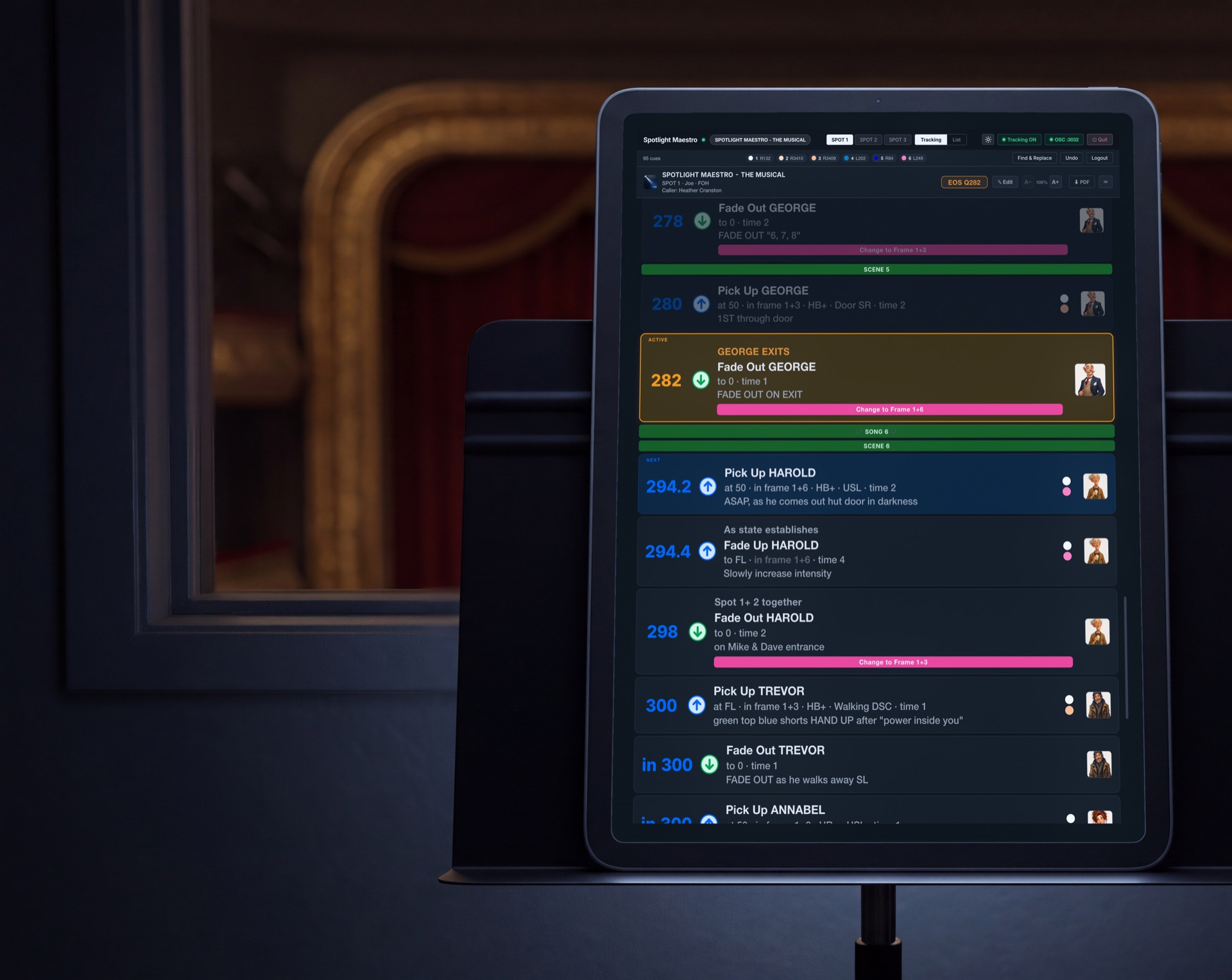 The booth · the tracking layout on the operator's stand
Theatre networks are fixed and usually cut off from the internet. Spotlight Maestro is designed for exactly this arrangement.
Nothing loads from the web while it runs and nothing phones home. Fonts, graphics, the database, the whole app: it all ships in the download and works on a local machine.
The app answers to a short, local network name on Mac, iPad and Windows alike, with numeric addresses and QR codes for anything that needs them. Fixed IPs, DHCP, wired or wireless: it works on the network you already have.
If another copy of the app is answering to the same name on the network, every connected device shows a warning bar. The wrong-computer mistake gets caught before it costs anyone a plot.
Each operator's screen sends a heartbeat to the host. The master plot shows a green dot on every spot whose tablet is on the network and a pulsing red one the moment it drops, and the operator sees the same dot on their own screen. Nobody has to ask on headset. See it on the operator views.
Every edit is written to the show file the moment it is made, and broadcast to every device. Everyone in sync the moment you finish typing.
The last twenty changes, each described in plain words with who made it. Open the list, pick a point, and the app tells you exactly what will be undone.
Every edit and every login, named and timestamped. When the plot says something surprising, you can find out who changed it and when.
The whole production, photographs and all, as a single file you can keep anywhere or carry to another computer. Offered every time you quit.
| The host machine | A Mac running macOS 11 or later, or a PC running Windows 11. One per show. |
|---|---|
| Operator devices | Anything with a current browser: iPad, laptop, tablet, phone. They just open a page. |
| The console | ETC Eos family, grandMA2 or grandMA3, with show control output enabled. The app also runs happily with no console at all. |
| The network | The network you already have. Wired or wireless, fixed IPs or DHCP, no internet required. |
| Followspots | One to twenty, conventional or automated. If someone follows a person with a light, this is their cuesheet. |
Exactly how the plot follows your Eos, grandMA2 or grandMA3, cue by cue.