
Users and roles
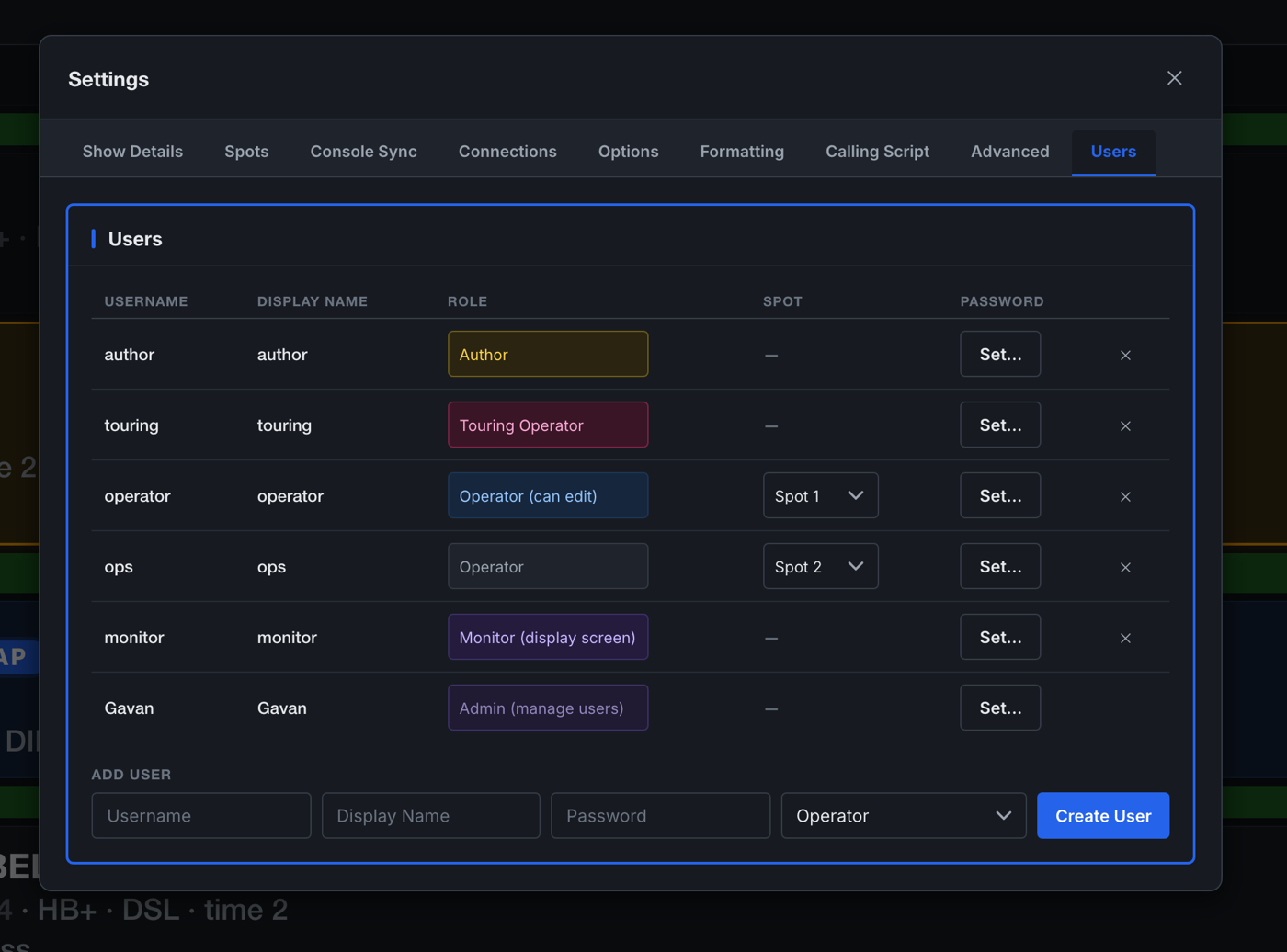
Every person using Spotlight Maestro signs in with an individual account. The account's role determines which layouts, tools and settings are available. Every change made in the application is recorded in the change log together with the account name and a timestamp.
The roles
| Role | Intended for | Permissions |
|---|---|---|
| Admin | The person responsible for the production | All functions, including user management and the network port. On a production licence this is the account defined by the licence, and there is only one. |
| Author | Designer, associate, assistant, caller | Create and edit the entire plot; run every tool and every export; configure the console connection. Access to all settings except the Users tab. |
| Touring Operator | The operator who travels with the production | All Author permissions, plus the My Call layout: the calling script with their own spot's cues excluded, so they can call the remaining spots while operating their own. |
| Operator (can edit) | Operators maintaining their own track | Track the show; read all layouts; edit existing cues in place, with undo. Cannot create or delete cues, and cannot access tools that affect other spots. |
| Operator | Followspot operators | Read only. Track the show, select a spot, set text size, export their own PDF sheets. |
| Monitor | A display screen, not a person | A read-only master plot that always follows the live cue. No editing, no settings, no other layouts. |
Managing accounts
User management is in Settings, Users, and is available to the Admin account only.
- Create a user by entering a username, display name and password, and selecting a role.
- Assign a spot to an operator account. That operator's sheet then opens automatically wherever they sign in.
- Change a role at any time. The change applies to the account's next request, not its next sign-in.
- Delete an account and it stops working immediately, on every device.
- Set a password at any time. Passwords are stored only as one-way cryptographic hashes: no password can be read back by anyone, including the application. A lost password is replaced, not recovered.
The licensed administrator account is defined by the licence: it cannot be renamed, demoted or deleted. Its password can be changed in the application after signing in. Record the administrator credentials securely; see chapter 11 for the recovery procedure if they are lost.
Session behaviour
Session lifetimes differ by role, deliberately:
- Admin, Author and Touring Operator sessions end when the application restarts. Accounts with the ability to change the production re-authenticate after every restart.
- Operator and Monitor sessions persist for up to 30 days. An application restart during a performance does not sign the followspot operators out. A bookmarked operator device returns directly to its sheet.
- Sessions are specific to one installation and one production. A session token from one show is not valid on another, so a device signed into a previous production cannot reach the current one.
- Quitting the application requires the host machine. The quit command is only accepted from the host itself, never from a connected device, regardless of role.
The Monitor account
A Monitor sign-in converts any browser device into a read-only master plot that always follows the live cue, regardless of the tracking state of any other device. It is intended for unattended displays. The same layout is available by appending ?display=1 to the application address on the host.